- Published on
- • 9 min read
Observing and Steering your AI Agents via Kanban
- Authors

- Name
- Ching Chew
- Socials
Imagine multiple AI agents running in an organisation and the user needs to keep track of what each agent is doing, guide the agents that have gone off course and review the outputs of agents that have completed. The current "wall of text" across multiple Claude Code tabs that most of us see is not the best user experience.
In this post, I show you that you don't need to build a custom human-in-the-loop (HITL) user interface to manage multiple AI agents. The kanban board your team already uses can do the job.
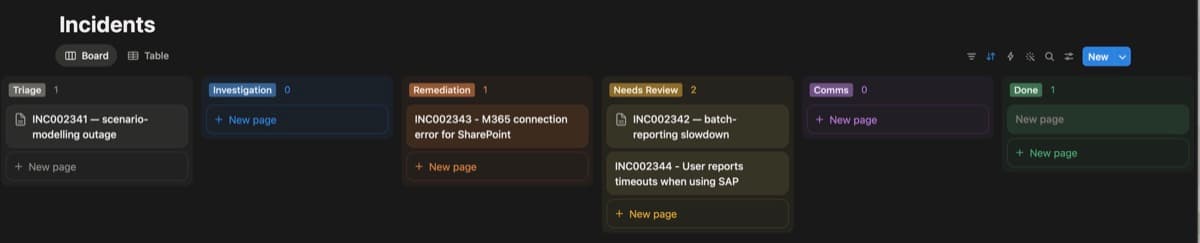
The screenshot above shows multiple AI agents operating across a multi-stage pipeline: searching the corporate knowledge base, checking system logs, adjusting behaviour based on user input and surfacing all agent decisions in a familiar user interface.
Card status tracks pipeline progress. Card comments carry agent outputs and operator notes. The comment API is the HITL channel: any board with one (Jira, Azure DevOps Boards, GitHub Projects) fits the same pattern.
Architecture
Four stages: Triage, Investigation, Remediation and Comms. Each stage is a Hermes Agent session, configured here to run Claude. Hermes was chosen for its built-in FTS5 (SQLite full-text search; phrase-sensitive) session memory, which the three-layer memory architecture (see below) depends on. pipeline.py sequences the stages, updates Notion card status and implements two HITL patterns via comment polling.

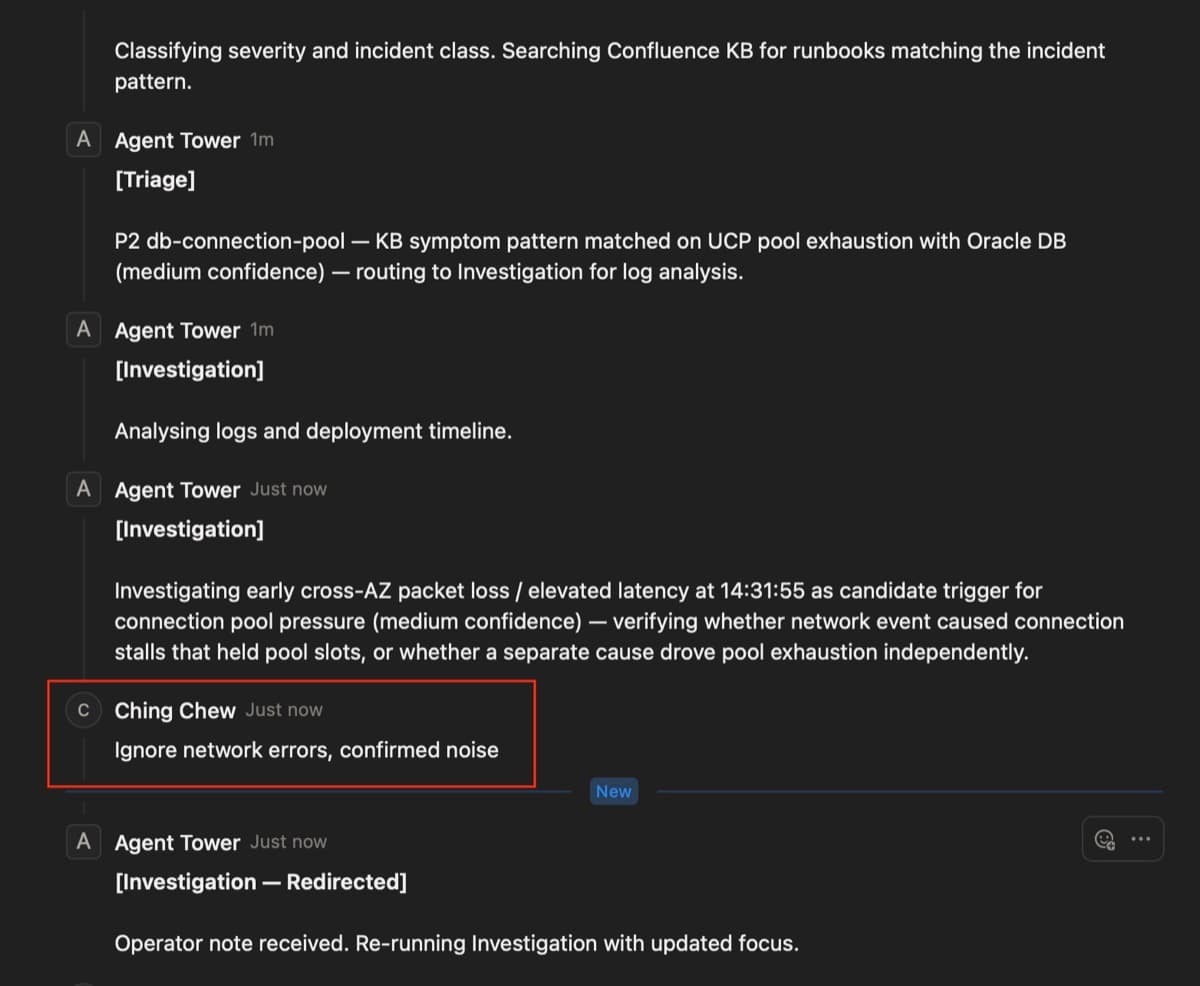
Steer (Investigation): the agent posts its findings to the card as a comment, then polls for 20 seconds (in production, tune hitl_window_s to match your incident response SLA as 20 seconds is a demo value.). If the operator leaves a comment during that window, the stage re-runs with the operator note injected. No comment means to auto-advance. This is the steer-while-moving pattern: catch a wrong hypothesis before it propagates to the next stage.
Gate (Comms): the agent posts a draft and moves the card to "Needs Review," then polls indefinitely. A keyword approval ("lgtm", "approved", "ship it") sends the brief unchanged. Anything else is a redirect: the stage re-runs with the note applied. Comms is the external-facing deliverable; a human approves it before it leaves the pipeline.
Both patterns use the same _poll_for_new_comment function and the same Notion comments API. The difference is the timeout and the approval keyword check.
Implementation
Triage as a structured decision gate
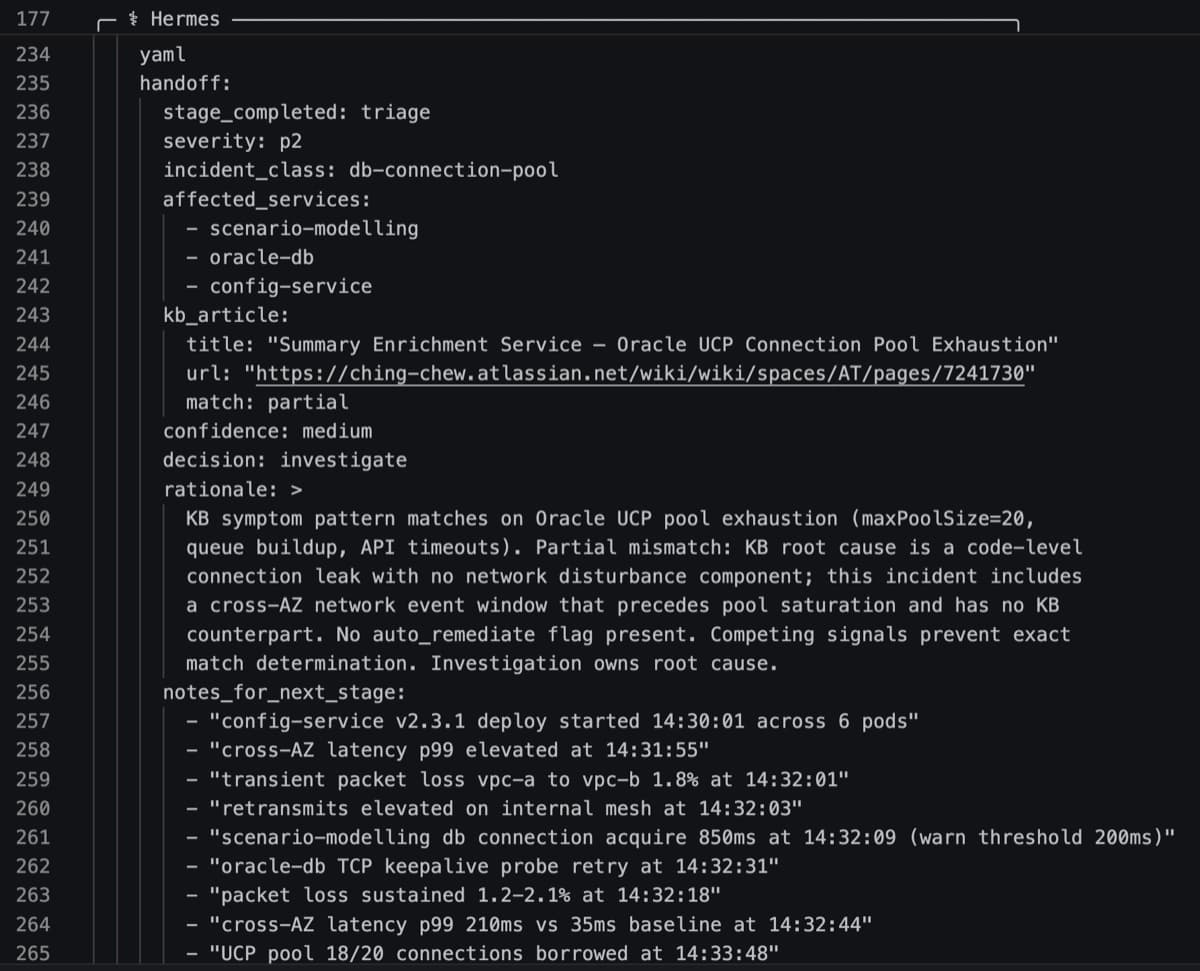
Triage classifies the incident and branches the pipeline. Every Triage run emits a handoff YAML block that pipeline.py parses to decide what runs next.
Three decisions are possible: investigate (default), auto-remediate (skip Investigation when the KB match is exact and symptoms are unambiguous) and escalate (pause on "Needs Review" when confidence is too low to proceed).
handoff:
  stage_completed: triage
  decision: investigate
  confidence: medium
  rationale: KB pattern matched on connection pool exhaustion; log signals consistent but a competing rollback signal warrants investigation
  notes_for_next_stage:
    - DB connection acquire latency above threshold from 14:32:09
    - config-service v2.3.1 deploy started at 14:30
    - transient packet loss WARN at 14:32:01-14:32:14
pipeline.py reads decision and branches:
if decision == "auto-remediate":
    skip_stages.add("Investigation")
elif decision == "escalate":
    _set_status(card_id, "Needs Review")
    _post_comment(card_id, f"Triage escalated (confidence: {confidence}). Rationale: {handoff.get('rationale', 'not provided')}", label="Triage — Escalated")
    return 0
The Triage prompt has an explicit constraint: do not name root causes. Triage classifies symptoms and finds matching KB runbooks; Investigation owns diagnosis. Passing a pre-formed hypothesis to Investigation anchors it before it has read the logs. The notes_for_next_stage field is timeline facts only: observable signals, no causal claims.
Two patterns, one mechanism
Both HITL patterns work by detecting a new comment via _poll_for_new_comment, then calling _build_prompt with operator_note appended. The STAGES config is explicit about which pattern applies to each stage:
STAGES: list[dict] = [
    {"name": "Triage",        "hitl": None,      ...},
    {"name": "Investigation", "hitl": "steer",   "hitl_window_s": 20.0, ...},
    {"name": "Remediation",   "hitl": None,      ...},
    {"name": "Comms",         "hitl": "gate",    ...},
]
Triage and Remediation have no HITL window. Investigation gets Steer (time-bounded, 20 seconds). Comms gets Gate (indefinite, with keyword approval).
Phase-reset: one stage, not the whole run
When the operator leaves a note, pipeline.py re-runs only the affected stage. Prior outputs are preserved and passed in as PRIOR STAGE OUTPUT(S). Triage's KB retrieval and Investigation's log analysis do not re-run.
# Steer: Investigation — poll after completion
if hitl == "steer" and not dry_run:
    _post_comment(card_id, trimmed, label=name)
    known_comment_ids = _comment_ids(_get_comments(card_id))
    comment = _poll_for_new_comment(card_id, known_comment_ids, timeout_s=window_s)
    if comment:
        prompt_rev = _build_prompt(
            stage, incident_text, log_text, prior_outputs, operator_note=comment
        )
        output = _run_hermes(prompt_rev, run_dir, f"{name}-revised", dry_run)
_build_prompt appends the operator note at the end of the assembled prompt, after prior stage outputs and the incident report. The agent sees the full context plus the correction. State from earlier stages is preserved; the correction costs one stage.
Operator notes as durable memory
Gate introduces a subtlety: the operator's formatting instruction from Run 1 should apply to Run 2 automatically, without re-stating it. The Comms agent retrieves that correction on the next run and applies it without being told again.
The Comms prompt handles this in Step 1. Before drafting, the Comms agent searches past Hermes sessions via FTS5 for prior operator corrections:
BEFORE drafting, search past Comms sessions for prior operator corrections.
Use session search with these queries:
- "Applied operator note"
- "operator override format"
- "Comms — Revised"
When Run 2 searches, Hermes finds the Run 1 session and returns a match like this:
Prior guidance found. Session 20260617_134017_0a8bd2 contains the marker:

[Applied operator note: Use 3 bullet points, lead with customer impact — from current pipeline OPERATOR NOTE]

No current OPERATOR NOTE in this pipeline input overrides it. Applying the 3-bullet customer-impact-first format now.
The agent then opens its response with a marker:
[Applied prior guidance: Use 3 bullet points, lead with customer impact — recalled from prior session]This marker is the contract. Memory only earns its keep when the prompt actively asks for it and the retrieval result is checkable. If the Comms agent silently changed its output style between runs, there would be no way to know whether memory fired or whether the model just happened to produce a different format.
The three-layer memory architecture makes this possible:

Confluence holds static knowledge: KB articles created by the Doco Agent from past Slack threads. Hermes FTS5 holds operational memory: per-session outputs that agents can search across. Notion holds workflow state: card status, agent outputs as comments, operator corrections. The knowledge layer comes from an upstream agent; the next operationalises it. One agent captures organisational knowledge. The next searches it.
Conflating any two layers is the common mistake. The Comms agent querying Confluence for formatting guidance, or Triage querying Hermes sessions for KB articles, would produce noise. Each layer has a distinct access pattern.
Results
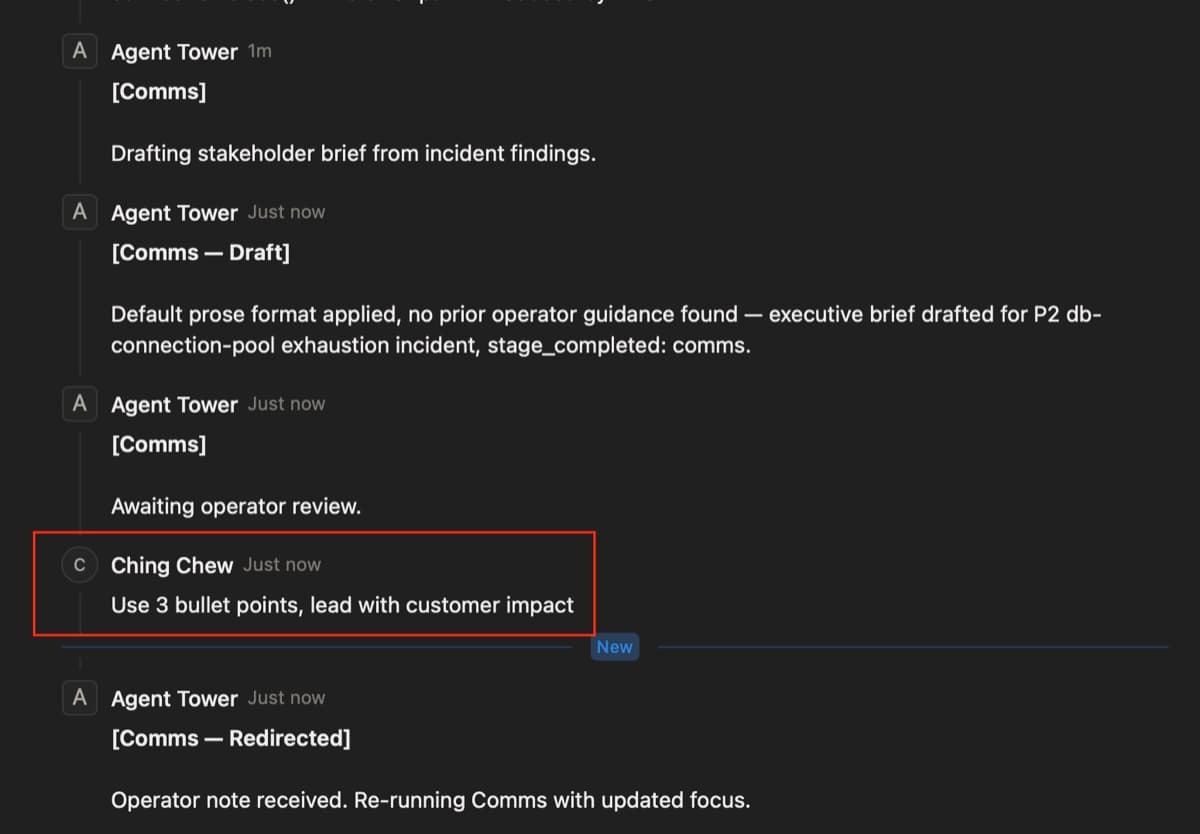
Run 1: the pipeline runs all four stages. Triage matches a connection-pool KB runbook (medium confidence) and routes to Investigation. Investigation posts findings; the operator catches a wrong hypothesis (network was the assumed cause) and leaves a comment redirecting it to disk I/O. Investigation re-runs with the correction. Comms drafts a verbose brief; the operator leaves "use 3 bullets, lead with customer impact." Comms re-runs and applies the format.
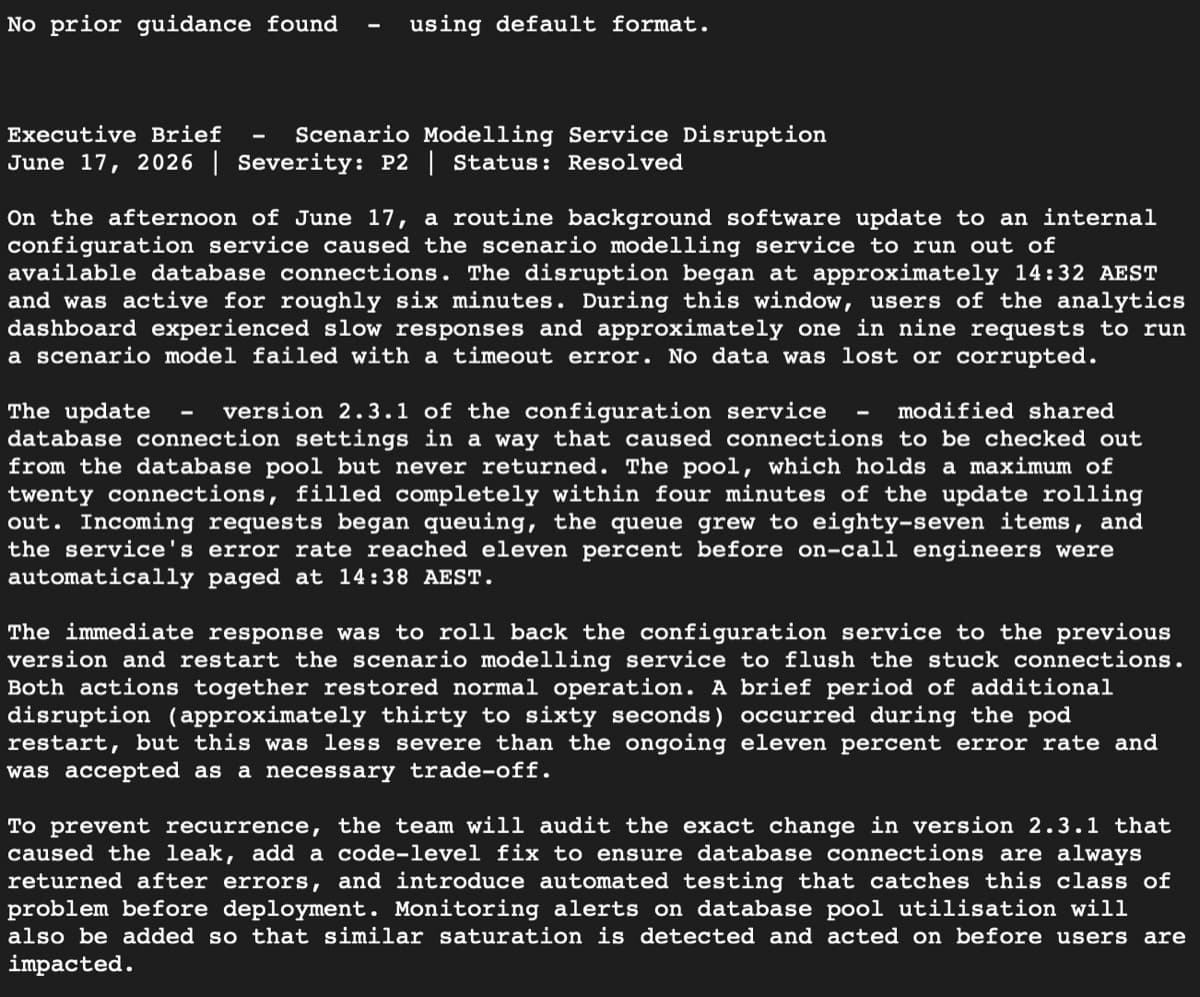
Run 2: a different incident. No operator interaction at any stage. The Comms agent queries Hermes FTS5, finds the Run 1 correction and auto-applies the 3-bullet format. The instruction was never repeated.
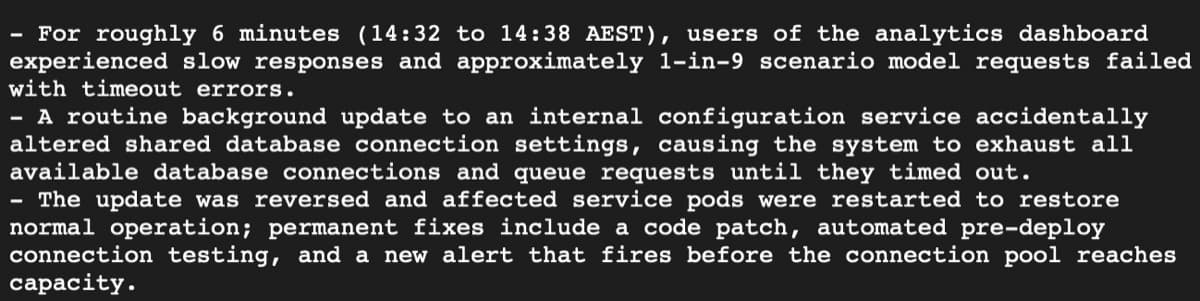
Two runs, both patterns, via kanban comments. No custom UI. No tool changes between runs. The audit trail (every agent output, every operator correction, every redirect) lives in the card comments.
Where It Goes Next
Agent Tower is the pattern. These are the tools that ship it in production.
For execution engines: LangGraph is the strongest OSS choice if you want Steer and Gate as first-class primitives, with production-grade checkpointing, interrupt/resume and Python-native state management. If you are in an Azure environment, AutoGen v0.4+ is worth considering; the v0.2 multi-agent conversation API is deprecated and v0.4 is a full rewrite. Dify gives you a visual builder with built-in HITL approval flows and is the lowest-code entry point if you want to avoid orchestration Python.
For control planes: if your team runs on Jira, Atlassian Rovo ships Jira-native agents with ticket comments as the HITL channel. Notion shipped Custom Agents in February 2026, which automate recurring workflows directly inside your workspace; if your team is already there, their agents are the lower-friction path. If you are in a Microsoft 365 environment, Copilot Studio provides fleet-level agent visibility and governance across the tenant.
Observability gap. The current build has no tracing layer. What did the agent decide? That lives only in Notion comments. Langfuse is the most straightforward drop-in for Python-based agent pipelines to surface stage outputs, token counts and latency without opening the terminal.
Memory quality. Hermes FTS5 works for exact-phrase search but struggles when prior operator corrections were phrased differently from the search query. Mem0 or a vector store would handle semantic retrieval without rewriting the pipeline structure.
Mixed human/agent board. The natural extension is not a technical upgrade. It is a conceptual one. If a kanban card can represent an agent run, it can equally represent a human task. Both post comments, both steer the pipeline, both show as status changes on the same board. The surface for mixed human/agent coordination already exists.

Code and Further Reading
The full source is on GitHub. The stack is Python 3.12, Hermes Agent (Nous Research), Notion REST API and httpx.
AI Tools
Claude Code was used to plan and build the demo, and Claude was used to draft the blog post.