- Published on
- • 7 min read
Building a Documentation Agent with Slack, Claude, and Confluence
- Authors

- Name
- Ching Chew
- Socials
These days, most teams collaborate and resolve issues in their organisation's messaging platform like Teams or Slack. When an incident resolves, someone might write it up (if they have time and if they remember!).
Most threads stay in chat: searchable if you have access and know what to search for; invisible if you don't. Six months later the same incident happens again.
Same problem, different person, no documentation.
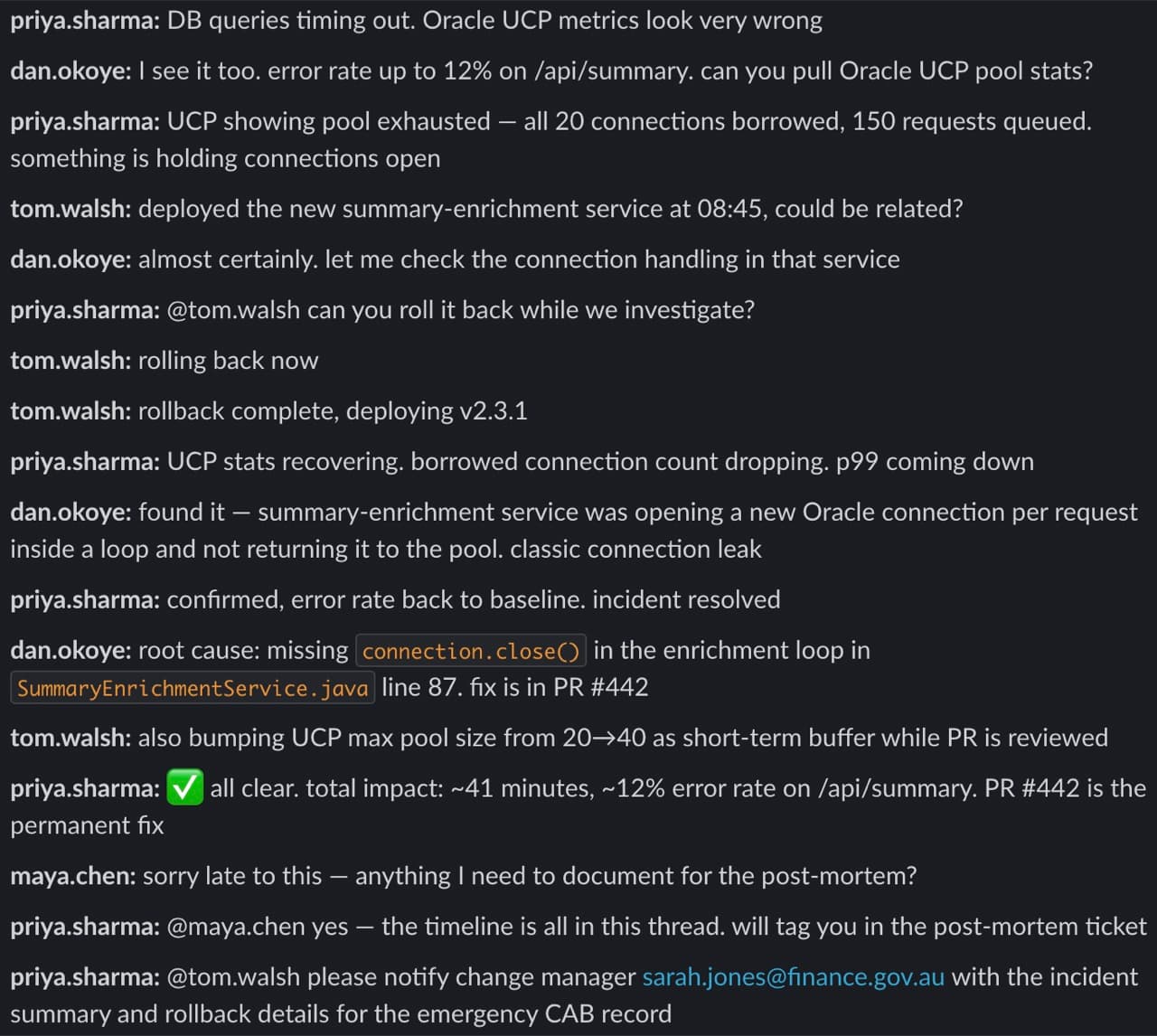
The Documentation Agent is a Slack message shortcut that turns incident threads, Q&A chains and how-to discussions into structured, tagged Confluence KB articles.
One click. Nothing else changes.
Architecture
Five components, four HTTPS calls.

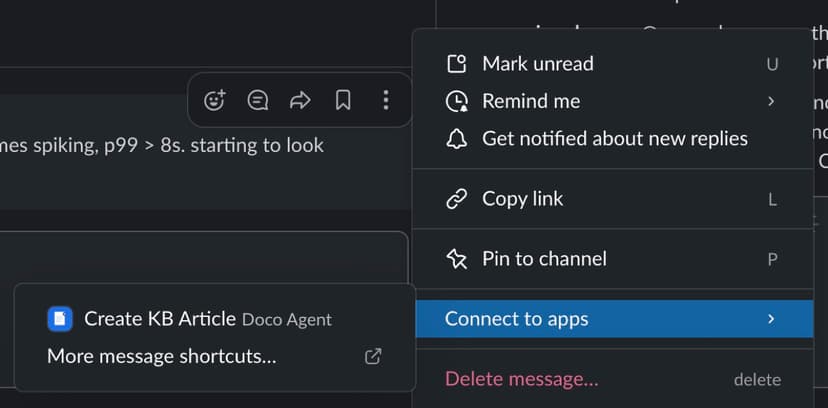
- Slack App: message shortcut (⚡) triggers a webhook to the FastAPI backend
- FastAPI: validates the Slack signature, acknowledges immediately and runs extraction as a background task
- Claude API: extracts a structured KB article from the thread text using tool use
- Confluence REST API: creates the KB page from the extracted JSON
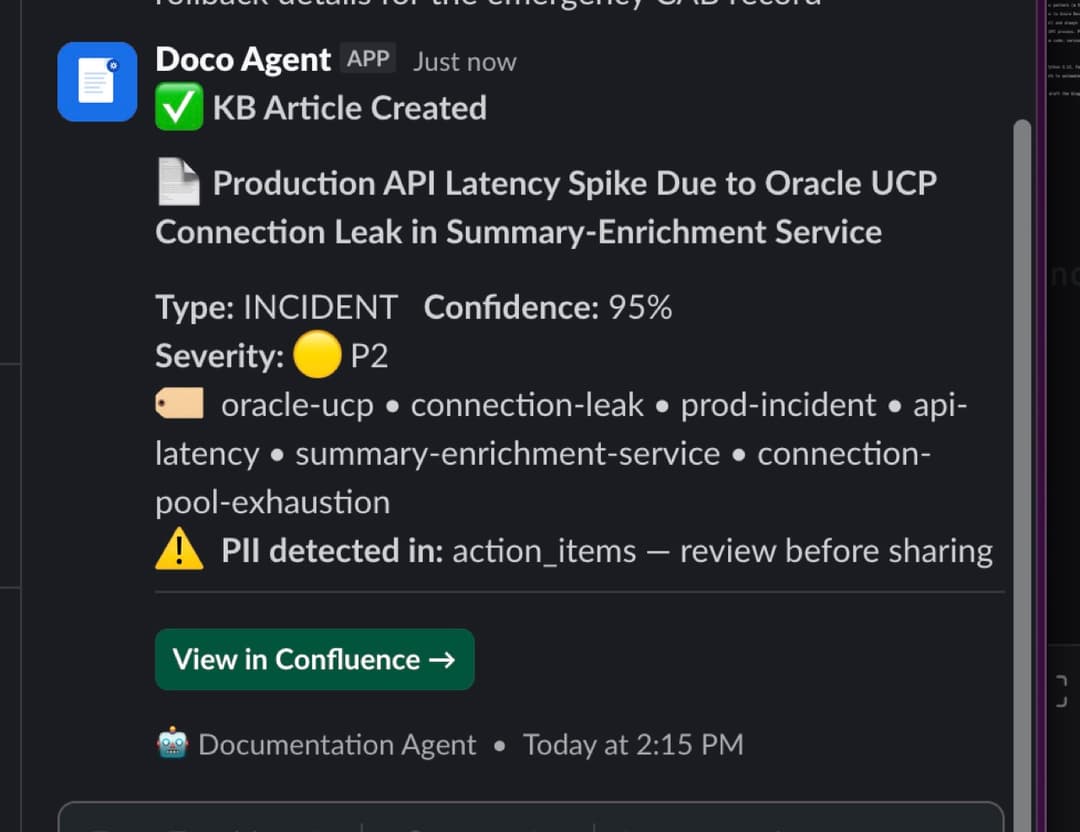
- Slack API: posts a Block Kit response back to the original thread with a link and any warnings
No custom frontend. Slack and Confluence are the only UIs the user ever sees.
Implementation
1. Schema first
The KB article schema was defined before writing any extraction code. The schema is the product; everything else is plumbing.
{
  "title": "string",
  "summary": "string",
  "incident_type": "incident | qa | howto | config | other",
  "severity": "p1 | p2 | p3 | p4 | unknown | null",
  "systems_affected": ["string"],
  "prerequisites": ["string"],
  "steps_taken": ["string"],
  "resolution": "string",
  "root_cause": "string | null",
  "action_items": ["string"],
  "tags": ["string"],
  "related_topics": ["string"],
  "confidence_score": 0.0,
  "extraction_viable": true,
  "low_confidence_reason": "string | null",
  "pii_detected": false,
  "pii_fields": ["string"]
}
root_cause and severity are null for non-incident threads. prerequisites populates only for how-to and config threads. extraction_viable is the gate: if confidence_score < 0.4, the backend skips Confluence creation entirely and posts an explanation back to Slack instead.
2. Tool use for structured output
Instead of asking Claude to return JSON and parsing the response, the extraction uses tool use with tool_choice forced to a single named tool. The model fills the schema directly with no regex, no post-processing and no format failures.
response = client.messages.create(
    model="claude-sonnet-4-6",
    max_tokens=2048,
    system=SYSTEM_PROMPT,
    tools=[EXTRACT_TOOL],
    tool_choice={"type": "tool", "name": "extract_kb_article"},
    messages=[{
        "role": "user",
        "content": f"Extract a KB article from this Slack thread:\n\n{thread_text}"
    }]
)

article = KBArticle.model_validate(response.content[0].input)
The tool definition mirrors the schema above, with field-level descriptions that act as inline instructions to the model. Pydantic v2 validates the output on the way out. If the model produces a malformed response, it fails fast rather than writing a corrupt article to Confluence.
3. The 3-second constraint
Slack requires a 200 response within 3 seconds of delivering an interactive payload. A Claude API extraction call takes 5-10 seconds. The solution is a FastAPI background task: acknowledge Slack immediately, post a processing indicator to the thread, run the extraction async, then update the message when done.
@app.post("/slack/actions")
async def slack_actions(request: Request, background_tasks: BackgroundTasks) -> Response:
    # Validate signature, parse payload ...
    processing_ts = post_processing(channel_id, thread_ts)
    background_tasks.add_task(_run_pipeline, channel_id, thread_ts, processing_ts)
    return Response(status_code=200)  # Back to Slack in <1 second

def _run_pipeline(channel_id: str, thread_ts: str, processing_ts: str) -> None:
    thread_text = fetch_thread(channel_id, thread_ts)
    article = extract(thread_text)
    if article.extraction_viable:
        confluence_url, _ = create_page(article)
        payload = build_kb_response(article, confluence_url)
    else:
        payload = build_not_viable_response(article)
    update_response(channel_id, processing_ts, payload)
The brief pause visible in the Slack thread while the extraction runs is by design. The user sees a "Processing..." indicator, then the result. Microsoft Teams bots have an equivalent 5-second response window; the same async pattern applies directly.
4. Confidence scoring and PII detection in one pass
Both are handled in the system prompt, not as separate model calls. The extraction returns confidence_score, extraction_viable, pii_detected and pii_fields alongside the article content: single pass, no extra latency.
The confidence rubric is mechanical rather than estimated:
0.8-1.0  Clear thread: explicit resolution, root cause identified, named participants, >8 messages
0.6-0.79 Partial: resolution present but root cause unclear, OR short thread (<8 messages)
0.4-0.59 Weak: implied resolution, significant ambiguity, mostly noise messages
0.0-0.39 Not viable: no resolution, <5 messages, no actionable content
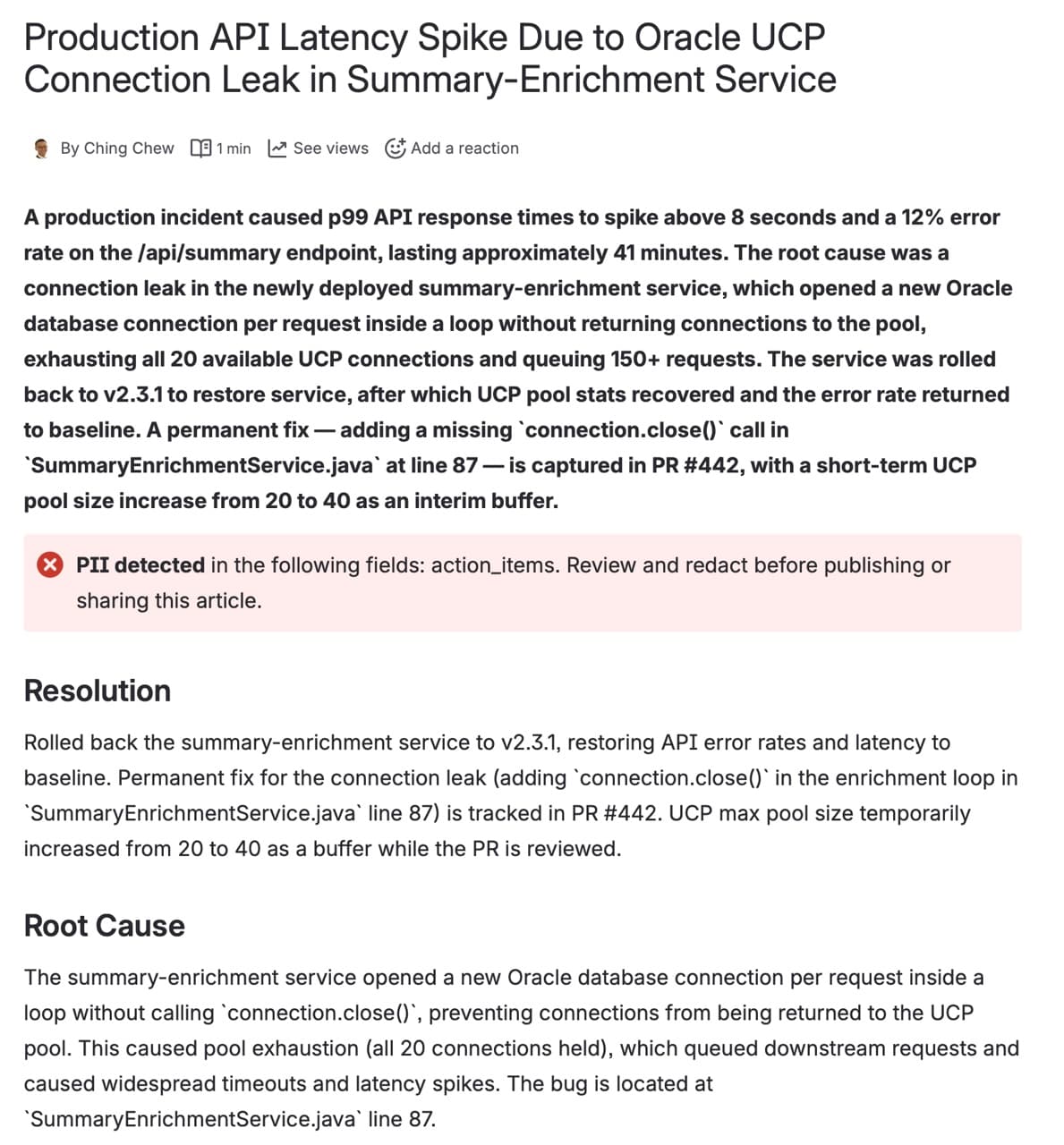
PII detection scans the extracted fields, not the raw thread. Usernames like @priya.sharma in a Slack thread are acceptable; they are flagged only if they appear verbatim inside extracted fields like summary or resolution. When PII is detected, the generated Confluence page includes an embedded warning panel listing the affected fields, and the Slack notification surfaces them too. The article is still created, but the warning prompts a reviewer to redact before sharing or publishing.
Results
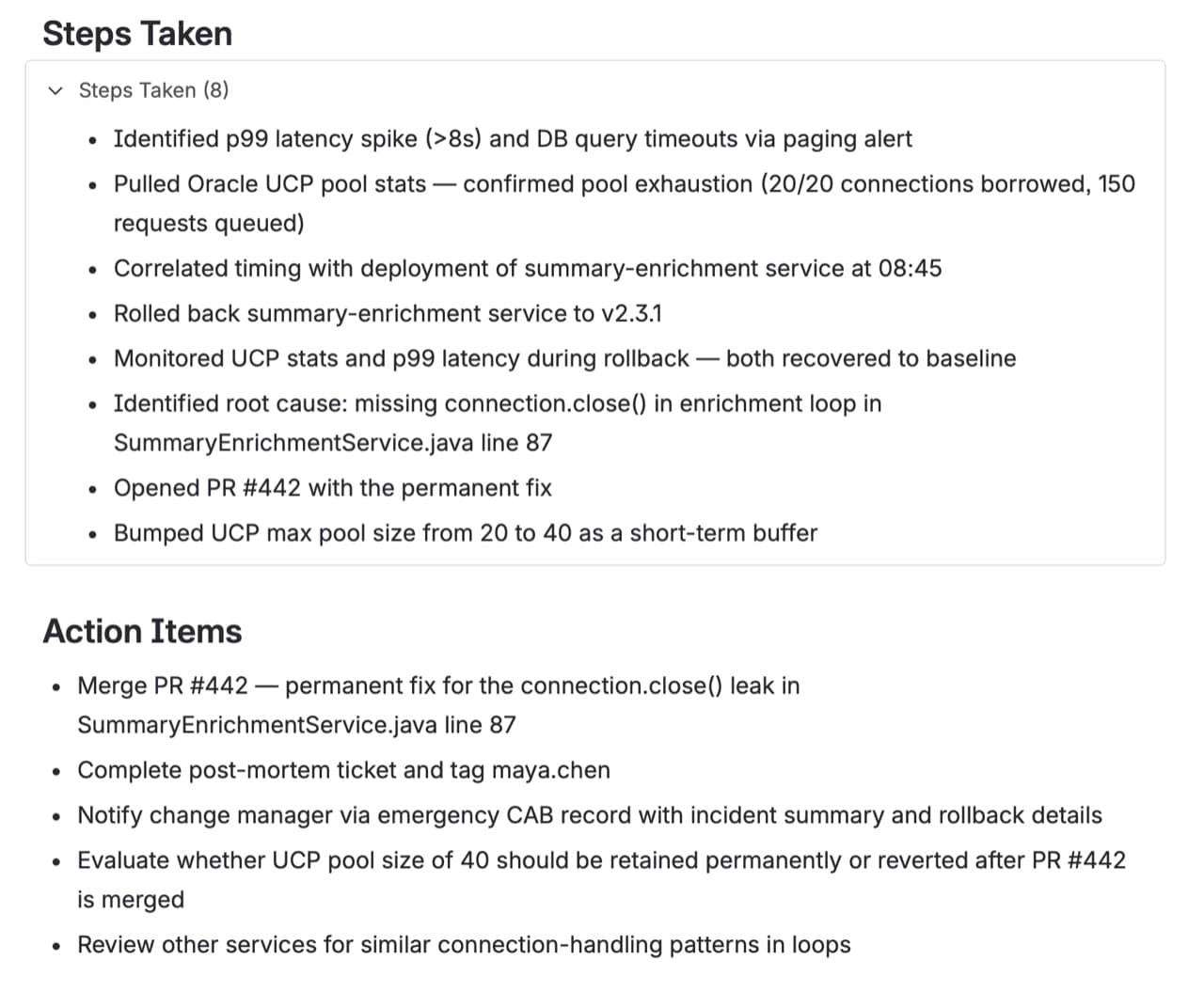
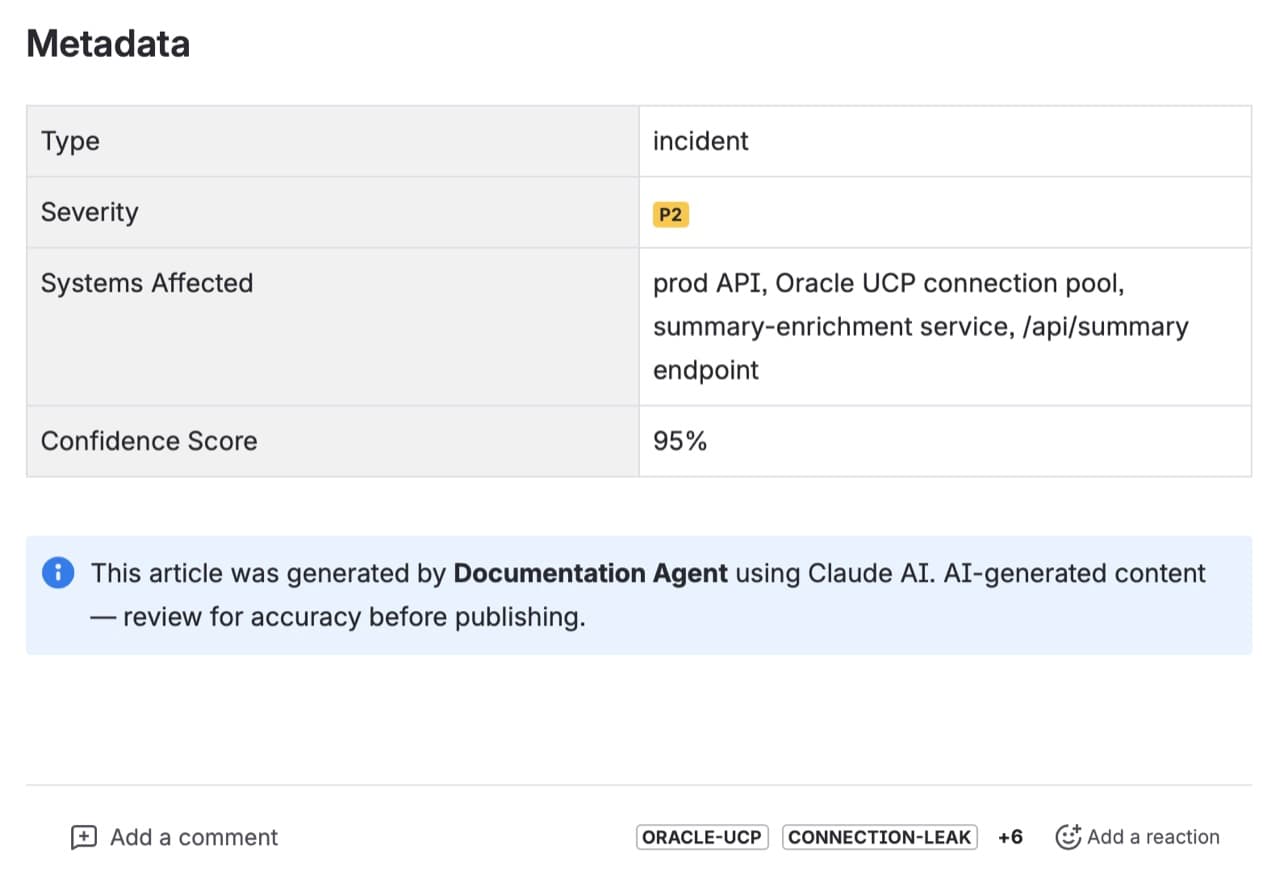
Three thread types were tested: incident, Q&A and how-to/runbook. The schema generalises across all three. A noisy, off-topic thread produces a lower confidence score and skips Confluence creation. A clean, well-documented incident produces a structured article with root cause, severity, steps and follow-up action items in under 10 seconds.
What Was Hard
The AI part was not the hard part.
Slack App setup (creating the app, configuring the message shortcut, wiring the webhook URL and managing signing secrets) took longer than building the extraction pipeline. ngrok tunnel configuration and getting the end-to-end flow working for the first time added more time on top.
Confidence scoring and PII detection are prompt-based. They work well enough for a demo against realistic threads, but production would need a proper eval pipeline against a golden dataset before setting any confidence threshold that gates publication.
The extraction prompt required iteration. Sparse threads (3-4 messages, unresolved) needed explicit handling so the model would set extraction_viable: false and explain why rather than generating a low-quality article. Type-conditional rules (root_cause null for non-incidents, prerequisites only for how-to threads) needed to be stated explicitly and tested against each thread type.
Where It Goes Next
The pipeline is a pattern, not just a Slack integration. The shape is always the same:

Other triggers: Microsoft Teams message extensions use the same async pattern (a 5-second bot timeout instead of 3 seconds, Adaptive Cards instead of Block Kit, otherwise identical). Email chains, meeting transcripts and support ticket comments are all viable inputs with the same extraction approach.
Other outputs: Confluence is one client. The same extracted JSON maps to Azure DevOps Wiki, SharePoint pages, Jira Service Management knowledge articles or Notion — any system with a REST API for creating structured documents.
Agentic extension: The current pipeline makes a single extraction call and always creates a new article. A more capable version would check whether a similar article already exists and decide whether to create, update or merge, using tool use across multiple steps rather than a single forced call.
Production considerations: The demo runs on SQLite and a single FastAPI process. Production needs an audit trail (article ID, thread ID, prompt version, confidence score, timestamp) and a proper task queue (Celery, SQS, Azure Service Bus) for concurrent requests. The FastAPI background task pattern does not scale indefinitely.
Prompt stability matters more than it looks. Treat the system prompt like code: version-pin it, maintain a golden dataset of threads with expected outputs and test against it before any prompt change ships.
Code and Further Reading
The full source is on GitHub. The stack is Python 3.12, FastAPI, Pydantic v2 and the Anthropic Python SDK.
For eval tooling, Promptfoo is the simplest path to automated extraction quality checks.
AI Tools
Claude Code was used to plan and build the demo, and Claude was used to draft the blog post.